You open TronLink (or another non-custodial wallet), paste the recipient's address, enter the USDT amount, hit Send — and instead of a confirmation you get a red OUT_OF_ENERGY message.
The transfer fails, or worse, it shows as failed on TronScan and some TRX is gone anyway. It's one of the most common errors on the TRON network, and the good news is that it's also one of the easiest to fix. Usually in under a minute.
This article explains exactly what the OUT_OF_ENERGY error means, the four situations that trigger it, and the fastest ways to get your USDT transfer through.
What the OUT_OF_ENERGY error actually means
On TRON, every USDT (TRC-20) transfer is a smart contract call, and smart contract calls run on a resource called Energy. A standard USDT transfer needs about 65,000 Energy, and if the recipient has never held USDT before, it jumps to about 131,000 Energy.
When you sign the transaction, the network tries to pay for that Energy in this order:
- First, from the Energy already on your account (staked or delegated to you).
- Then, by burning your TRX at the current network rate (100 sun per Energy unit) — but only up to the fee limit your wallet set for the transaction.
If the contract execution runs out of Energy and there's no room left to burn TRX, the TRON Virtual Machine stops mid-execution and reverts everything with the OUT_OF_ENERGY status. Your USDT stays put — but the fee doesn't come back: under TRON's rules, an abnormal exit like this deducts the transaction's full Energy allowance, up to the fee limit your wallet set. That's the part that stings: a failed transfer still costs real money.
Why it happens: the four usual suspects
1. Zero Energy and not enough TRX to burn
The classic case. Your wallet holds USDT but almost no TRX. With no Energy on the account, the network needs roughly 6.5 TRX to burn for a standard transfer — and if your balance is, say, 2 TRX, the transaction can't be paid for and fails.
2. The recipient has never held USDT
You checked the math for 65,000 Energy, but the destination address is fresh — it has never received USDT. Writing a new record into the USDT contract's storage roughly doubles the cost to ~131,000 Energy. Your Energy or TRX covered half the job, then the execution hit the wall.
3. The wallet's fee limit was set too low
Every smart contract transaction carries a fee_limit — a cap on how much TRX the wallet allows the network to burn. TronLink sets this automatically, but if the limit turns out lower than the transfer really needs (for example, because of the fresh-recipient case above), execution stops with OUT_OF_ENERGY even though you technically had the TRX.
4. The dynamic Energy model raised the cost
TRON's dynamic Energy model adds a surcharge to contracts that are used heavily: when a contract's consumption exceeds a network threshold during a maintenance cycle, every call to it temporarily costs extra Energy — and USDT is the busiest contract on TRON. A transfer that cost 65,000 Energy yesterday can require somewhat more today. If your resources were calculated to the last unit, the surcharge pushes you over the edge.
The math behind the error
| Scenario | Energy required | TRX burned if you have no Energy |
|---|---|---|
| USDT to an address that already holds USDT | ~65,000 | ~6.5 TRX |
| USDT to an address that never held USDT | ~131,000 | ~13 TRX |
| Bandwidth for the transaction (if the free 600/day is spent) | — | ~0.35 TRX |
So the rule of thumb: to guarantee a USDT transfer goes through, your wallet needs either ~131,000 Energy (the safe amount that covers any recipient) or around 13–14 TRX ready to burn. Buying the Energy is the far cheaper of the two.
How to fix OUT_OF_ENERGY, step by step
Here's the decision path, then each option in detail:
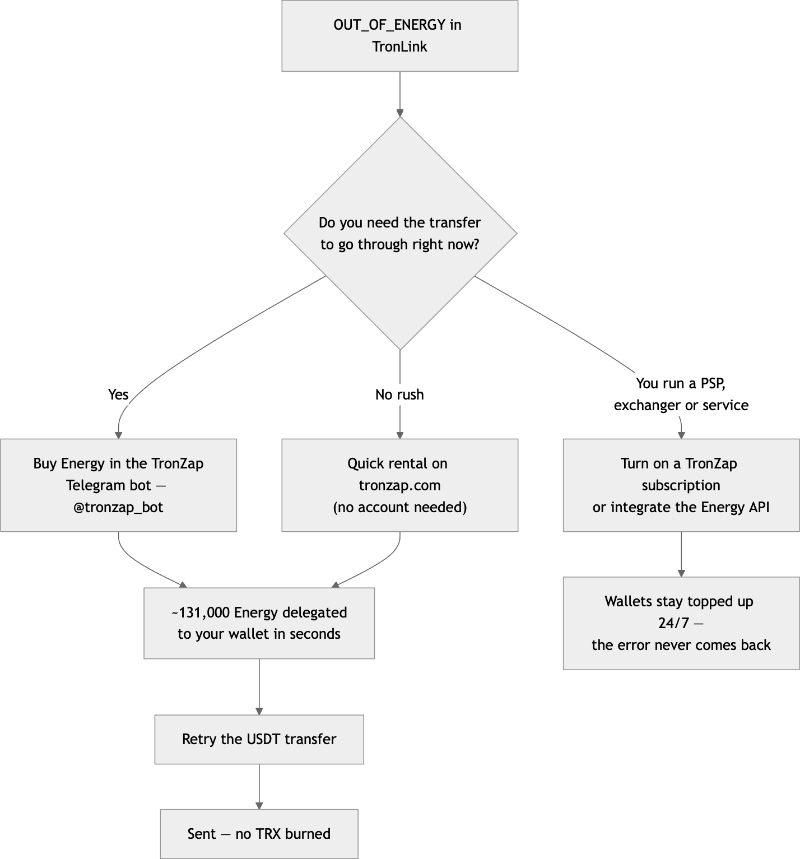
The fastest fix: buy Energy in the TronZap Telegram bot
If you just want the transfer done, the quickest route is to buy TRON Energy on TronZap — and the most convenient way to do that is the Telegram bot:
- Open @tronzap_bot in Telegram.
- Top up your bot balance with TRX.
- Tap Buy Energy, paste your TRON wallet address, and pick the amount — take at least 131,000 Energy if you're not sure about the recipient.
- Confirm. The Energy is delegated to your wallet on-chain within seconds.
Then go back to TronLink and resend the USDT. The transfer now spends the delegated Energy, no TRX gets burned, and the error is gone. The bot is non-custodial: it only ever asks for your public address, never your seed phrase or private key.
No account, no Telegram: quick rental on the website
On tronzap.com there's a quick rental address right on the homepage. Send a small amount of TRX to it from your wallet, and TronZap automatically delegates the corresponding Energy back to the sending address within about a minute. No registration, no forms. If you're not sure how much your specific transfer needs, run the address through the free Estimate Energy tool first — it accounts for the recipient's USDT history.
The expensive fallback: top up TRX and let it burn
You can also just deposit 14–15 TRX into the wallet and resend. The network will burn ~6.5–13 TRX and the transfer will go through. It works, but you're paying the highest possible price for the same result — renting the same Energy on TronZap costs a fraction of that. Treat burning as an emergency exit, not a habit.
Staking: only for heavy, constant volume
Staking TRX under Stake 2.0 generates Energy daily, but the numbers are steep: as of mid-2026 it takes roughly 5,000 staked TRX to cover a single USDT transfer per day, and unstaking locks you in for 14 days. It's the right tool for large operations with idle TRX — not for fixing an error on a Tuesday afternoon.
If you're a PSP, exchanger, or payment service: stop fixing, start preventing
Seeing OUT_OF_ENERGY across dozens of payout wallets isn't a one-off annoyance — it's an operational problem. Failed payouts, support tickets, TRX burned on every retry. For businesses, TronZap offers two permanent fixes:
- Energy subscription. Enable it in your TronZap dashboard for each working address. TronZap then monitors the address around the clock and automatically tops it up so it always holds 131,000 Energy. Payouts simply never fail for lack of Energy, and you can cancel anytime — there are no lock-ins.
- API integration. Wire Energy purchases directly into your payout flow with the TronZap Energy API: estimate the exact Energy for a transfer, buy it programmatically, confirm delegation, then broadcast the USDT transaction. Official SDKs exist for PHP, Node.js, and Python, so the integration usually takes an afternoon, not a sprint.
How to never see this error again
- Keep the safe amount — 131,000 Energy — on any wallet that sends USDT, or turn on a TronZap subscription and forget about it.
- Before large or unfamiliar transfers, check the real cost with Estimate Energy instead of assuming 65,000.
- Remember that transfer size doesn't matter: 5 USDT and 50,000 USDT need the same Energy. Don't split transfers — it multiplies your costs.
- Hold a couple of TRX for Bandwidth edge cases, or rent an Energy + Bandwidth bundle so both resources are covered in one purchase.
Authors
Written by: Marc Wei — Blockchain Payments Engineer
Reviewed by: Aren Skovarr — TRON Architect, Researcher and CEX Strategist
Marc and Aren live and breathe the TRON ecosystem. They audit smart contracts, design staking and resource strategies, and put TRON energy to work across real business cases — payments, exchanges, iGaming.
As advisors at TronZap, they help users and businesses move digital assets the smart way.
Back